Release Notes: September 2026
In this article:
- Customizable Default Global Search Criteria
- Now Supporting Arizona and Canadian Time Zone
- Manual Date Entry & Enhanced Date Pickers
- Comprehensive Reporting Suite for Jobs - Financials
- New! Asset Exception Type Filter in all Views
- New! Bulk Update Action for Billing & Costing Automation
- New! Bulk Add or Remove Exceptions
- Jobs - Financials Fields included in Bulk Asset Import
General
Customizable Default Global Search Criteria
⭐ Customer-Requested Enhancement
✅ Release September 25, 2026
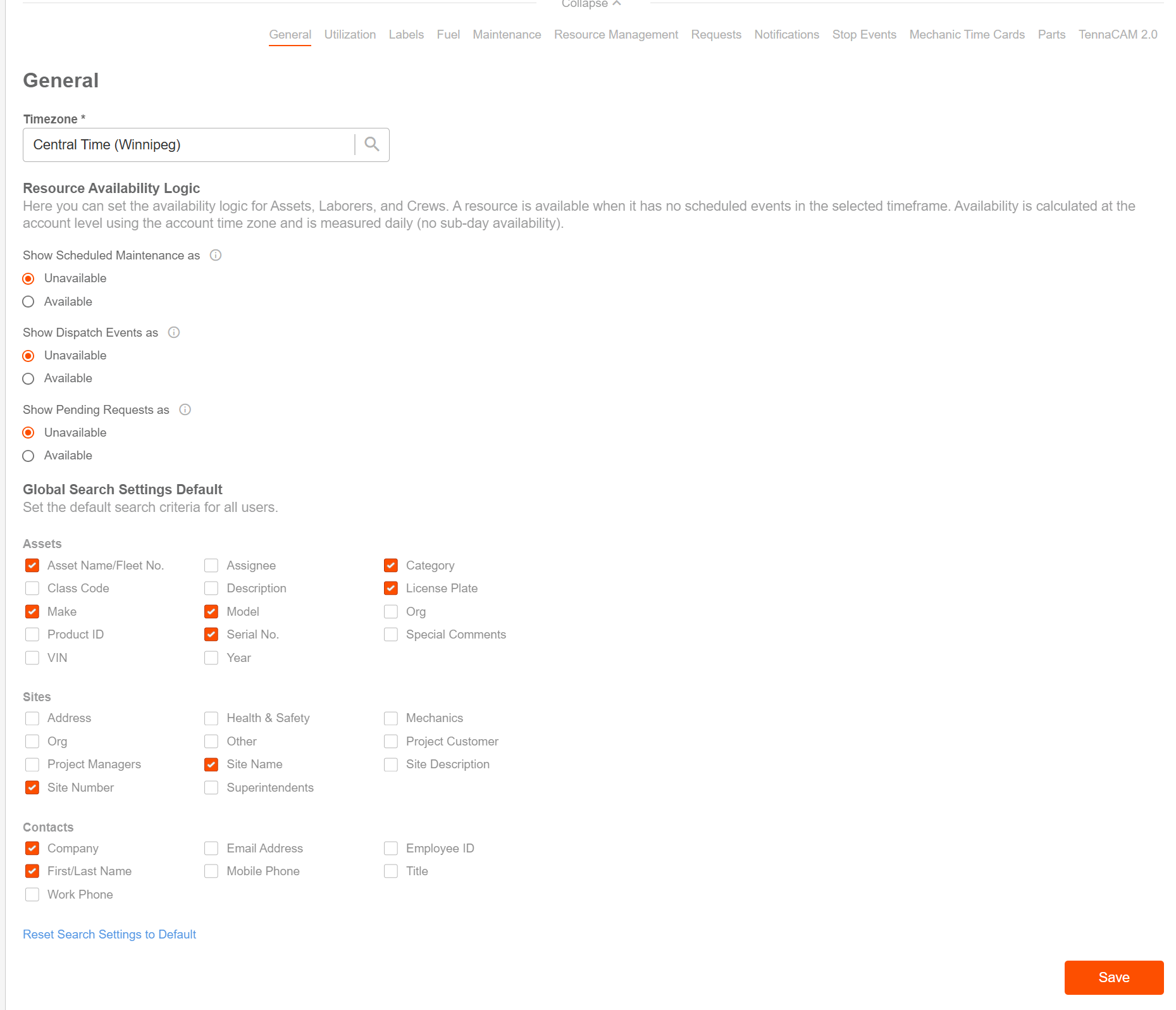
Administrators can now set default Global Search criteria across the organization to ensure users automatically search across the fields most relevant to their daily operations.
Key Highlights
-
Account-Wide Defaults: Admins can configure standard default search fields for Assets, Sites, and Contacts under Settings > Configurations> General > Global Search Settings Default.
Flexible Customization: Select which fields (such as Asset Name/Fleet No., Category, Make/Model, Site Name/Number, Contact Name, and more) should be included by default in search queries.
User & System Resets:
- Individual users can continue to adjust their personal search preferences or quickly restore their view to the organization's account defaults.
- Admins can revert account-level search settings back to standard system defaults at any time.
Now Supporting Arizona and Canadian Time Zone
⭐Customer-Requested Enhancement
✅Release September 25, 2026
Tenna now supports five additional timezones, so timestamps, daily reports, and utilization numbers reflect your true local time.
What's new
- Arizona (Mountain Standard Time – Phoenix): Arizona doesn't observe daylight saving time. Arizona accounts previously had to borrow Mountain or Pacific Time, which put times off by an hour for most of the year. Arizona now shows MST year-round.
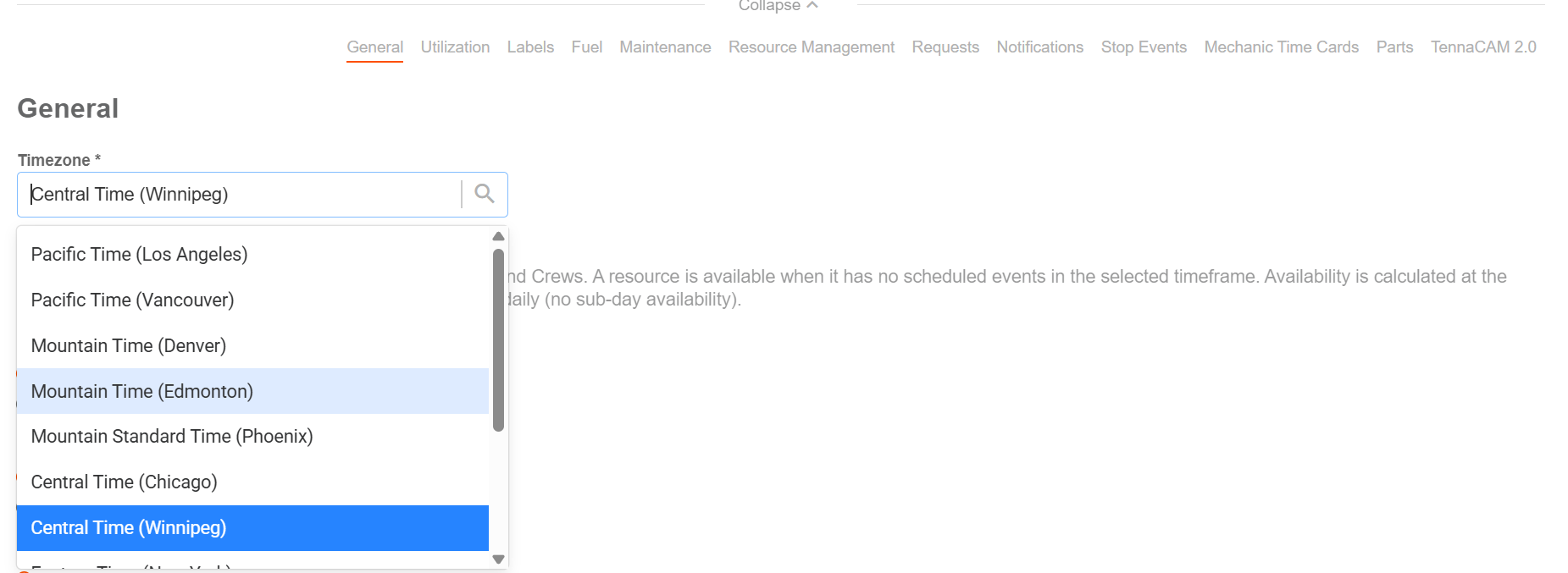
- Canadian timezones: Pacific Time (Vancouver), Mountain Time (Edmonton), Central Time (Winnipeg), and Eastern Time (Toronto).
- Clearer timezone names: Timezone pickers now include a city in each name, for example Pacific Time (Los Angeles) vs. Pacific Time (Vancouver), so zones that share a clock time are easy to tell apart. Exports show the same names.
Good to know
- Historical data is unchanged. Reports and utilization calculated before you switch keep their original timezone. The new timezone applies from the switch date onward.
- Integrations and bulk upload: The Integration API (user timezone) and bulk upload accept the new timezones using standard IANA names: America/Phoenix, America/Vancouver, America/Edmonton, America/Winnipeg, America/Toronto.
Manual Date Entry & Enhanced Date Pickers
⭐Customer-Requested Enhancement
✅ Release September 25, 2026
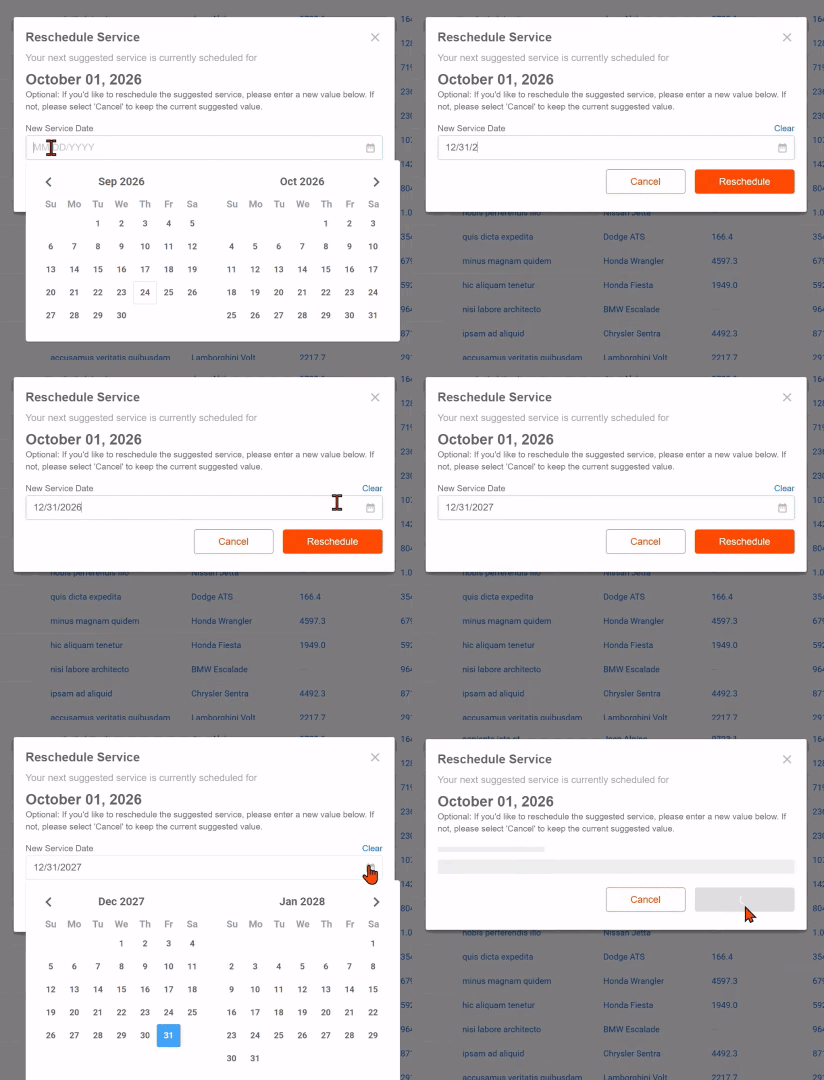
We have upgraded date selection components across Tenna to support manual keyboard entry alongside calendar pickers, streamlining date input and improving data accuracy across forms, schedules, and filters.
Key Highlights
- Direct Manual Date Entry: Users can now quickly type dates directly into date fields using standard date formats without having to click through calendar pickers.
- Streamlined Maintenance Workflows: Enhanced date entry across high-frequency maintenance forms, including Work Order scheduling, Maintenance Requests (needed-by dates), and PM reschedule modals.
- Platform-Wide Coverage: Upgrades date and date-time range selection controls across key modules, including Jobs, Assets, Timecards, Dispatch, Sites, and Reports.
- Inline Validation & Error Handling: Added real-time date validation to catch invalid dates or incomplete formats immediately, preventing submission errors.
Assets
Advanced Export Options & Current View Support
⭐Customer-Requested Enhancement
✅Released September 1, 2026
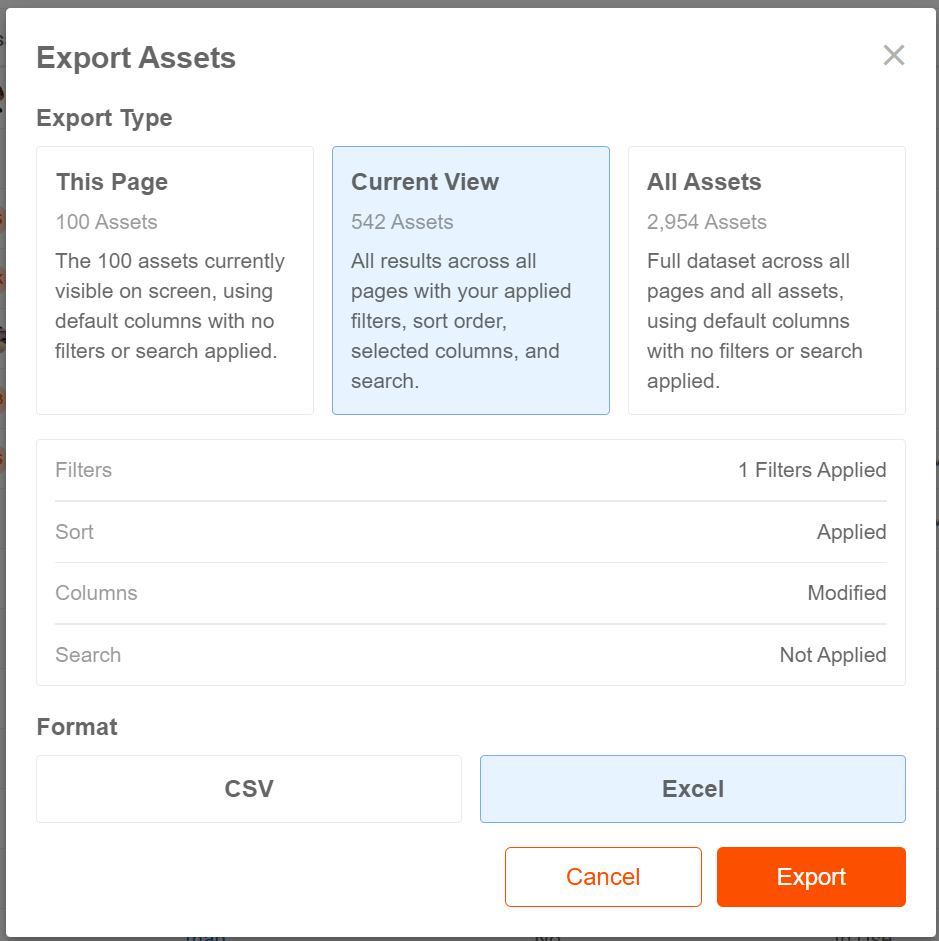
We have introduced an upgraded, dedicated export experience on the Assets list page, allowing users to export custom-queried and filtered asset views in addition to single pages or their full inventory.
Key Highlights
-
Standalone Export Button & Modal: Replaced the toolbar download icon with a prominent Export button in the Assets page header, opening a streamlined export modal.
Three Flexible Export Scopes:
- This Page: Instantly downloads only the records displayed on the current page.
- Current View: Exports the full dataset matching your active search, applied filters, customized column visibility/ordering, and sorting.
- All Assets: Exports the entire asset catalog across your organization.
- Active View Summary: When exporting the Current View, users see a dynamic breakdown summarizing active filter counts, custom sorting, search terms, and column adjustments.
- Format Flexibility: Choose between CSV and Excel (.xlsx) formats for all export types.
- Permissions & Data Access Control: Export access is protected by the Export Data permission and fully honors user-level Data Access Controls (DAC) and site-level boundaries.
- Smart Background Processing: Single-page exports download immediately in-browser, while larger custom and full-catalog exports process smoothly in the background with in-app status notifications.
Asset Financials
Comprehensive Reporting Suite for Jobs - Financials
✅Release September 25, 2026
- Expanded Financial Reporting: Introduced and upgraded a robust suite of financial reports, including Costing & Billing Transaction Details, Costing & Billing Breakdown Details, and Unbilled Assets.
- Job Association & Allocation Audit Trails: Gain full visibility into asset job movements over time with Job Association History / Logs and Current Job Association reports to see exactly which assets are currently assigned to each job.
- Streamlined Data Architecture: Removed deprecated legacy fields to ensure report outputs are clean, accurate, and aligned across job geofences and accounting workflows.
New! Asset Exception Type Filter in all Views
✅Release September 25, 2026
- Filter by Exception Type: Added an Exception Type filter to the Asset Filter Panel across all views (List, Grid, Group, and Map).
- Flexible Filtering Criteria: Filter assets by active or inactive exception types, or isolate assets with No Exception to quickly audit fleet configurations and spot items requiring attention.
- Permission-Protected: The filter is seamlessly gated by Job Accounting permissions to maintain administrative control.
New! Bulk Update Action for Billing & Costing Automation
✅Release September 25, 2026
- Multi-Asset Automation Updates: Users can now update Automate Billing and Automate Costing preferences for multiple assets simultaneously from the Assets list view.
- Operational Efficiency: Eliminates the need to configure automation settings asset-by-asset, accelerating fleet onboarding and rate rule adjustments.
New! Bulk Add or Remove Exceptions
✅Release September 25, 2026
- Bulk Exception Management: Added Add Exceptions and Remove Exceptions actions directly to the multi-select bulk action menu on the Assets page.
- Mass Application: Easily apply or clear rate and billing exceptions across groups of equipment with instant on-screen status feedback.
Jobs - Financials Fields included in Bulk Asset Import
✅Release September 25, 2026
- Import Template Expansion: Standardized asset CSV bulk upload templates to include dedicated job accounting columns:
- Automate Billing & Automate Costing
- Asset Billing Job Number & Asset Costing Job Number
- Single-File Upload: Assign default billing/costing jobs and automation settings at scale during initial asset onboarding or periodic mass data updates.
Integrations
Link-Belt OEM Integration: Updated API & Authentication Support
✅Release September 25, 2026
We have upgraded our Link-Belt OEM integration to support Link-Belt's new API service and modernized authentication model, ensuring uninterrupted telematics data ingestion and seamless onboarding for new customer connections.
Key Highlights
- New API Service Compatibility: Updated the Link-Belt AEMP (ISO 15143-3) telematics integration to connect directly to Link-Belt/Sumitomo's latest API endpoints for fleet and telematics data.
- Modernized Token Authentication: Implemented support for the new one-day token acquisition flow required by Link-Belt's updated infrastructure.
- New Customer Onboarding: Enables newly provisioned Link-Belt accounts to easily connect and sync their fleet data into Tenna without credential or compatibility blockers.
- Legacy Connection Support: Maintained compatibility for existing Link-Belt connections while establishing migration runbooks for future customer transitions.
Sunbelt Rentals Integration: New Snapshot API Support & Migration
✅Release September 25, 2026
We have upgraded our Sunbelt Rentals AEMP integration to support Sunbelt's new Snapshot API, ensuring continuous, uninterrupted rental telematics syncing and seamless customer account transitions ahead of legacy API deprecation.
Key Highlights
- New Snapshot API Integration: Updated the Sunbelt Rentals telematics integration to interface with Sunbelt's latest API endpoints for rental fleet data and telematics snapshots.
- Configurable Customer-Level Switching: Enabled configurable migration controls so Customer Success and Support teams can transition customer accounts between the legacy and new API versions dynamically without engineering deployment.
- Zero Disruption & Data Integrity: Maintained full data fidelity across rental fleet telematics, locations, and hour meter data with no sync downtime during customer transitions.
- Support Runbook & Rollback Controls: Established step-by-step verification procedures and safe fallback controls allowing instant rollback to the legacy API if needed during verification.
Reports
New Report: Asset Meter Updates
⭐Customer-Requested Enhancement
✅Release September 25, 2026
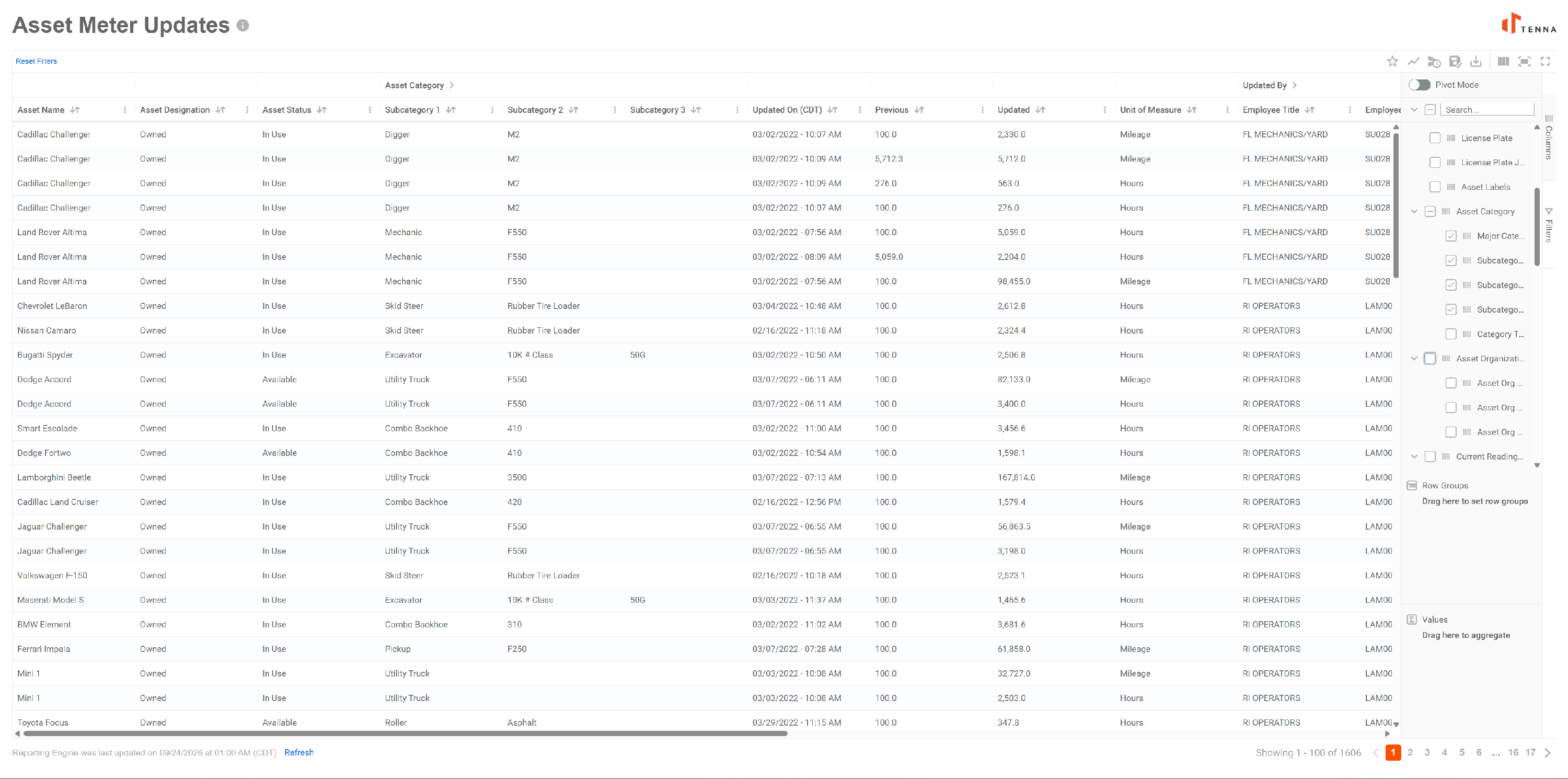
We have introduced the Asset Meter Updates report under the Performance reports section, providing fleet managers and administrators with a comprehensive audit trail of all manual and automated meter adjustments across hours and mileage.
Key Highlights
- Comprehensive Meter Audit Trail: View a complete history of meter changes across your entire fleet, capturing both manual meter updates (web/mobile) and OEM telematics adjustments in a single dataset.
- Before & After Tracking: Clearly compare Previous and Updated meter values side-by-side along with the unit of measure (Hours or Miles) to quickly identify anomalies and maintain data hygiene.
- User & Timestamp Attribution: Track exactly who made each update (Updated By name, employee ID, title, and department) and when the change occurred in the account's local time zone.
- Asset & Site Context: Includes full asset details (Asset Reference, Category, Designation, Status) and current site assignment for streamlined equipment tracking.
- Interactive Reporting Engine Features: Leverage standard New Reporting Engine (NRE) capabilities including quick date ranges, column reordering, grouping, pivoting, saved user views, and CSV / Excel export.
- Permissions & Data Access Control: Report access is governed by the View Asset Hours and View Asset Miles permissions and strictly honors Data Access Controls (DAC).
On-Demand Refresh & Timestamp in Report Page
⭐Customer-Requested Enhancement
✅Release September 25, 2026
We have added the Reporting Engine refresh component and last-updated timestamp directly to the individual report page, allowing users to view data freshness and trigger on-demand data updates without navigating back to the main reports directory.
Key Highlights
- In-Viewer Data Freshness Timestamp: Displays the exact date and time the reporting engine was last refreshed directly at the bottom of the report viewer, giving users immediate visibility into data currency.
- Consistent Rate Limiting & Feedback: Employs standard rate limiting and clear status tooltips to indicate when a refresh is actively running, along with standard cooldown periods to optimize system performance.
- Clear Exclusions Guidance: Includes contextual tooltips highlighting data sets excluded from manual refresh (such as Trip, Location, and Utilization history) and advising the use of operational grids for real-time same-day tracking.
NOTE: Power Users and users with the Refresh Reporting Engine permission enabled have access to this functionality.
Resource Management
Dispatch Requests: Bypass Field Approver Configuration
⭐Customer-Requested Enhancement
✅Release September 25, 2026
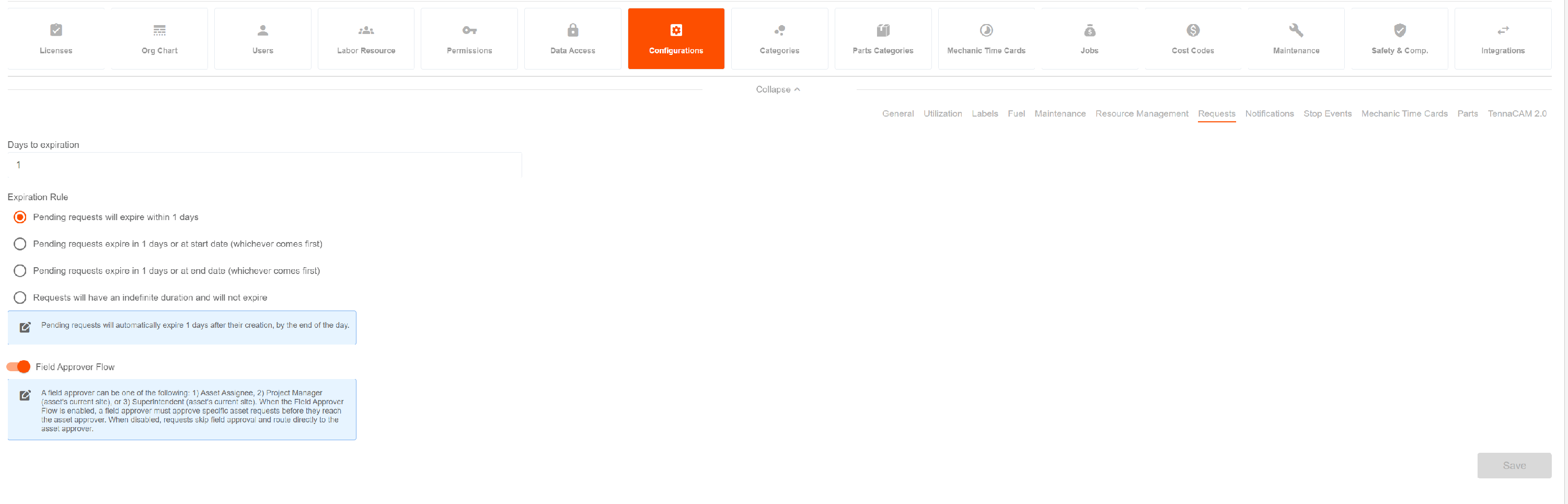
We have introduced a new account configuration for Dispatch Requests that allows organizations to bypass the Field Approver stage, streamlining the request-to-dispatch workflow for teams that do not require an intermediate field approval step.
Key Highlights
- Configurable Approval Workflow: Added an account-level setting in Dispatch Request Configuration to enable or disable the Field Approver approval state based on your operational workflow.
- Direct Dispatch Routing: When bypassed, newly submitted requests move directly to dispatcher review and scheduling queues without requiring field approver sign-off.
- Full Board & Request Sync: Seamlessly supported across Request creation forms, the Dispatch Requests grid, and the Dispatch Board (including bulk approval actions).
- Flexible Process Alignment: Allows companies with centralized dispatch models to eliminate redundant approval steps while preserving full approval workflows for teams that require them.
Schedule: Filter by Asset Designation
⭐Customer-Requested Enhancement
✅Release September 25, 2026
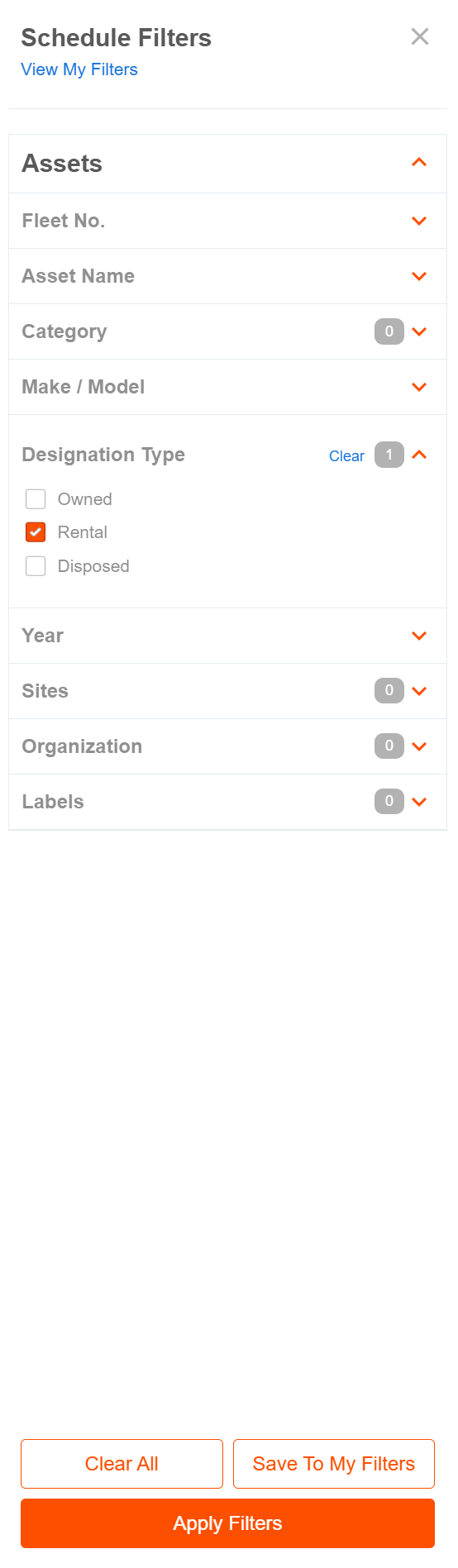
We have enhanced scheduling views across Resource Management by adding the Asset Designation filter, allowing dispatchers and resource managers to quickly segment and view equipment by operational classification.
Key Highlights
- Asset Designation Filtering: Filter schedule views by designations such as Owned, Rental, Subcontractor, or Disposed to tailor resource planning and visibility.
- Expanded Schedule Coverage: Available across the Global Asset Schedule, Custom Schedules, and the Site Details > Schedule View.
- Clean Resource Visibility: Helps planners isolate rented vs. owned equipment schedules or exclude inactive/disposed assets to prevent allocation conflicts.
- Consistent Filter Experience: Aligns with platform-wide settings and filtering standards for intuitive schedule customization and saved views.
Safety & Compliance
Assign Inspection Forms: DVIR Type & Inspection Code Bulk Configuration
⭐Customer-Requested Enhancement
✅Release September 25, 2026
We have enhanced the bulk Assign Inspection Forms modal in Manage Inspections to support DVIR-specific configuration, allowing administrators to specify DVIR types and inspection code counts across entire asset categories in a single bulk action.
Key Highlights
- Dedicated DVIR Assignment Flow: When bulk-assigning the system DVIR form, the assignment modal dynamically surfaces dedicated configuration fields for DVIR Form Type and # of Inspection Codes.
- Vehicle vs. Trailer Classification: Select whether category assignments apply as Vehicle Inspection or Trailer Inspection, ensuring assets in bulk-assigned categories receive the correct inspection classification rather than a generic default.
- Inspection Code Count Configuration: Specify the required number of inspection codes (0–99) directly in the bulk assignment modal, applying code requirements consistently across all affected assets.
- Automated Asset Mapping & Inheritance: Newly created assets added to previously mapped categories will automatically inherit the specified DVIR form type and inspection code settings in the background.
- Contextual Guidance for Trailers: Includes inline guidance when selecting Trailer Inspection to remind users that trailer categories should be reserved for trailers paired with primary vehicles.
- Improved Error & Partial-Failure Handling: Enhanced notification messaging with specific snack bar feedback if form updates succeed partially or require re-attempting due to network errors.
Tenna App
Cost & Billing Entry: Edit Permissions & State Restrictions
⭐Customer-Requested Enhancement
✅ Release September 25, 2026
We have updated cost and billing entry workflows in the Tenna App to strictly enforce approval workflows and user permissions, ensuring mobile behavior aligns with desktop rules for pending entry modifications.
Key Highlights
- Approval Workflow Alignment: Honors the Change Approval Workflow setting and enforces the Accept Changes to Cost/Billing Entries and Manage Cost/Billing Entries permissions on mobile.
- Restricted Pending Entry Editing: Prevents unauthorized editing of pending entries or adding notes when a user lacks approval permissions in accounts where approval workflows are enabled.
- Clear UI States & Validation: Eliminates silent save failures by disabling or hiding note entry fields and showing clear permissions feedback for restricted states.
Improved Maintenance Request Detail Page
⭐Customer-Requested Enhancement
✅Release September 25, 2026
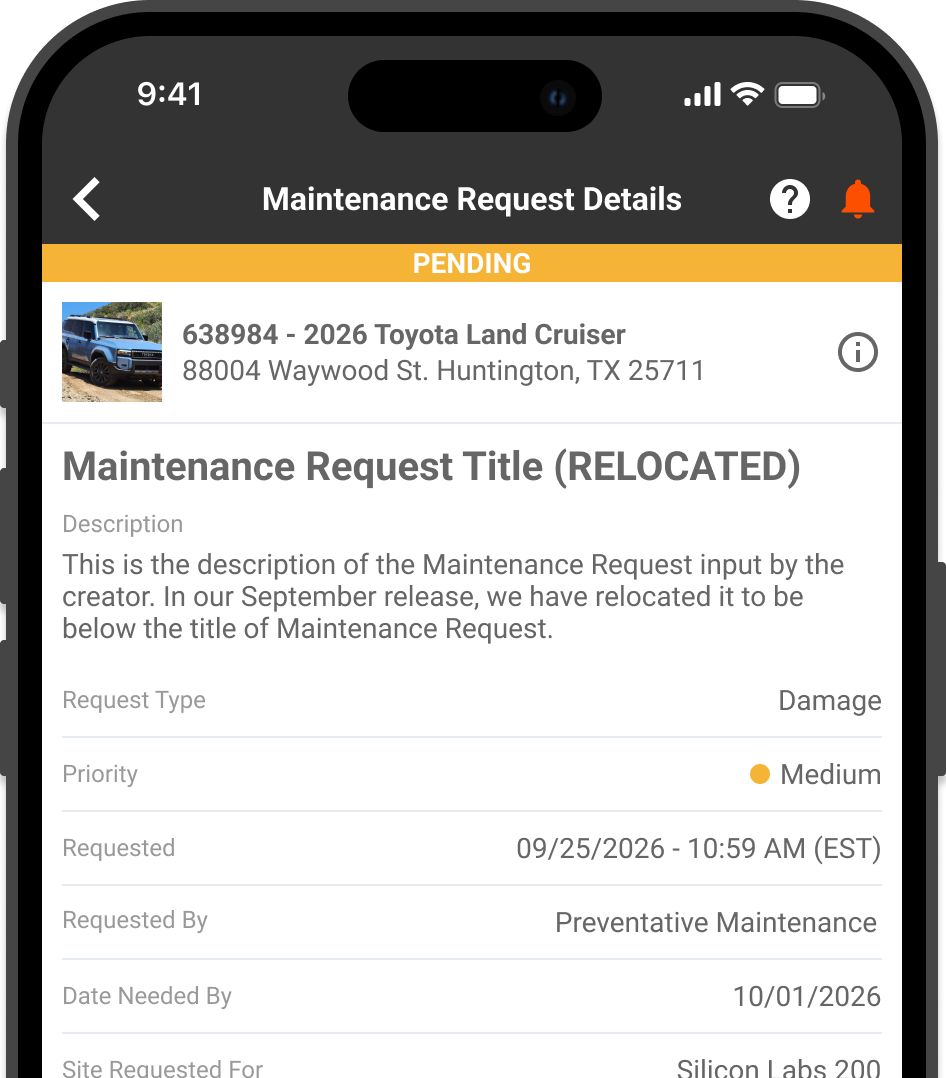
We have updated the Maintenance Request Details and edit screens in the Tenna App to improve readability and align the visual hierarchy with Work Order layouts.
Key Highlights
- Standardized Layout Hierarchy: Repositioned the Maintenance Request Title below the Asset Card and placed the Description directly below the title, creating a unified layout across Work Orders and Maintenance Requests.
- Multi-Line Title View & Text Wrapping: Expanded the Title field to support multi-line display with automatic text wrapping, allowing complete titles to be read and edited without truncation.
- Streamlined Header Navigation: Updated screen header titles and labels for clearer context when managing and editing maintenance requests in the field.
Time Cards: Default Chronological Sorting for Time Entries
⭐Customer-Requested Enhancement
✅Release September 25, 2026
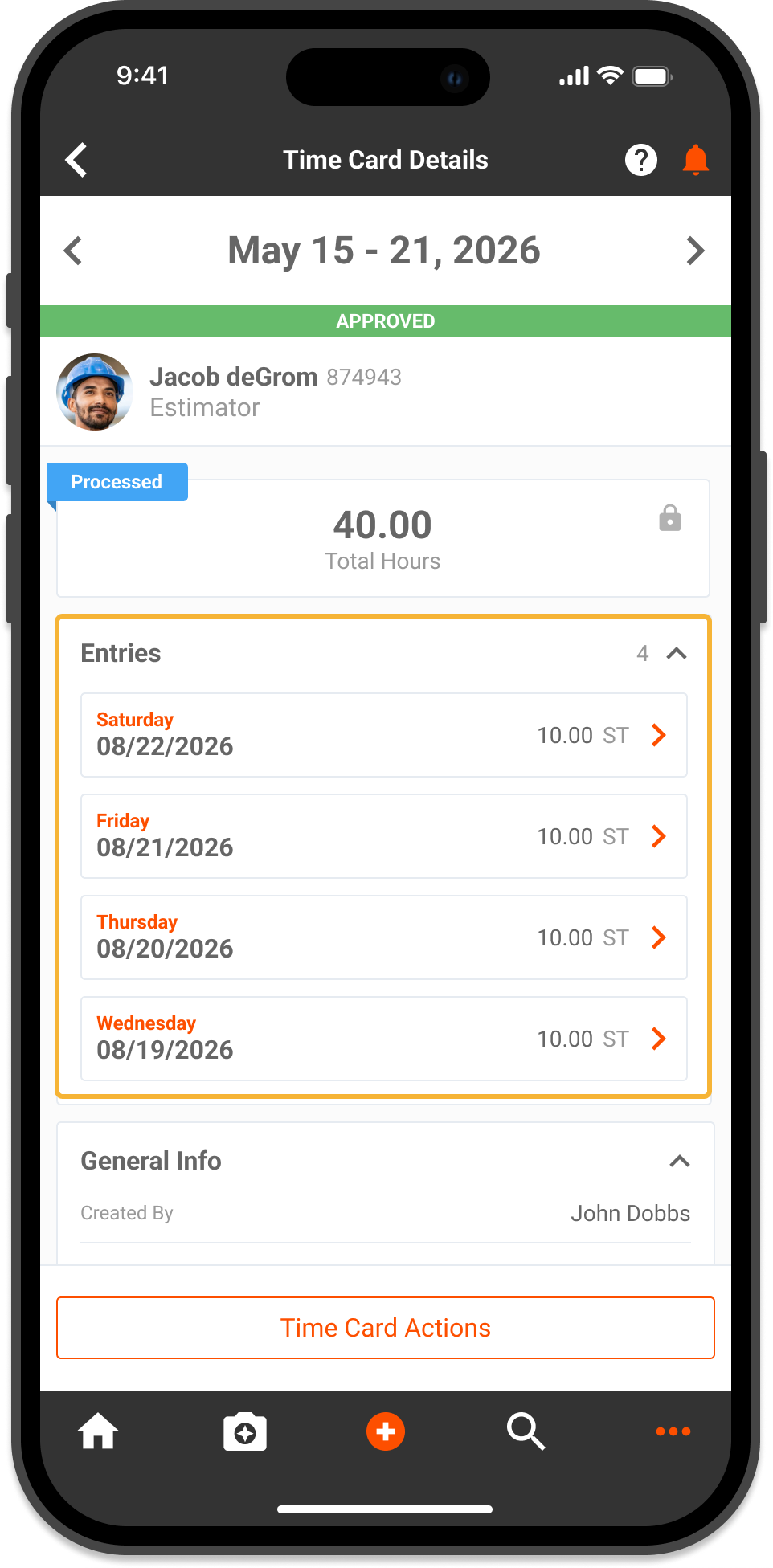
We have improved the display of daily time entries on mobile by establishing automatic chronological sorting across time card views.
Key Highlights
- Default Chronological Ordering: Time entries on the Time Card Details and Edit Time Card screens are now sorted chronologically by default.
- Web & Mobile Parity: Aligns mobile time entry presentation with the Tenna web platform for consistent daily record review across devices.
- Simplified Shift Review: Makes it faster and easier for field supervisors and crew members to verify daily work sequences, breaks, and multi-job time entries.