
Foundation Integration Overview & Requirements
Tenna is connected to Foundation to allow you to share data about your assets and sites with your construction accounting system. This allows for total visibility over operations and their associated costs, so your team can make informed decisions with accurate data. All company data stored in the database will flow into the single instance of Tenna.
💥Integrations is a premium product and requires a separate license. Please contact your Account Manager for more information on premium product licenses or reach out to Customer Support at help@tenna.com or call 888.836.6269.
In this article:
Data Flow
Enter Equipment Once
Enter a new piece of equipment in Foundation and it will automatically show up in Tenna.

Enter Jobs Once
Every job set up in Foundation can automatically be added to Tenna.
View Utilization Updates Always
Capture equipment hour and mileage meter readings and import them into Foundation via a custom translator.

Benefits of Integration
- Field Productivity: Alert a project team when a piece of equipment arrives at a jobsite or when it is left behind.
- Accurate Job Costs: View up-to-date equipment listings to code equipment hours more easily and accurately.
- Visibility over Equipment Costs: Analyze and review equipment cost more accurately.
- Collaboration and Efficiency: Keep your office, shop and field teams connected sharing the same data. Eliminate static spreadsheets with efficient data sharing.
- Accountability: Increase accountability among field teams when using or handling assets to help control costs.
- Decision Making: Make educated decisions by taking appropriate action when assets are under (or over) utilized.
Integration Setup Instructions
- 1
- Provide information to Tenna related to the server and how to access it from the internet.
If the server is hosted, Tenna will need:
- Server name (i.e. sql.foundationsoft.com)
- Port (i.e. 9000)
- Username
- Password
- Database name
- Encrypted true or false
If the server is on-prem, Tenna will need:
- Server name or IP address
- The server must be exposed to the internet and access granted to Tenna or whitelist of the Tenna list of egress IPs on your firewall.
- 2
- Choose one or both of the below modules to pull information from.
- Equipment (known as assets in Tenna)
- Jobs (known as sites in Tenna)
- 3
- Set up a new category of "New from Foundation" in the Tenna platform.
The category name must be "New from Foundation" (this is case sensitive) with a Category Type of Equipment.
See How to Create and Edit Categories (Desktop) for more information.
Important!
- Any information already in Tenna, will be changed to what comes from Foundation, including address changes.
- Do not remove any assets with a tracker from Tenna.
- Foundation has no API capabilities, so there is no Tenna-to-Foundation synchronization. The meter readings can be fed manually in Foundation by utilizing the import function in Foundation.
- Multiple Foundation databases feeding into one Tenna instance is not currently supported.
Field Mappings
IMPORTANT! Any information from Foundation will overwrite the existing information in Tenna for the fields in the Field Mapping tables below.
Foundation Jobs to Tenna Sites
- Filters: None
- Sync Frequency: Every 1 hour
Data Mapping
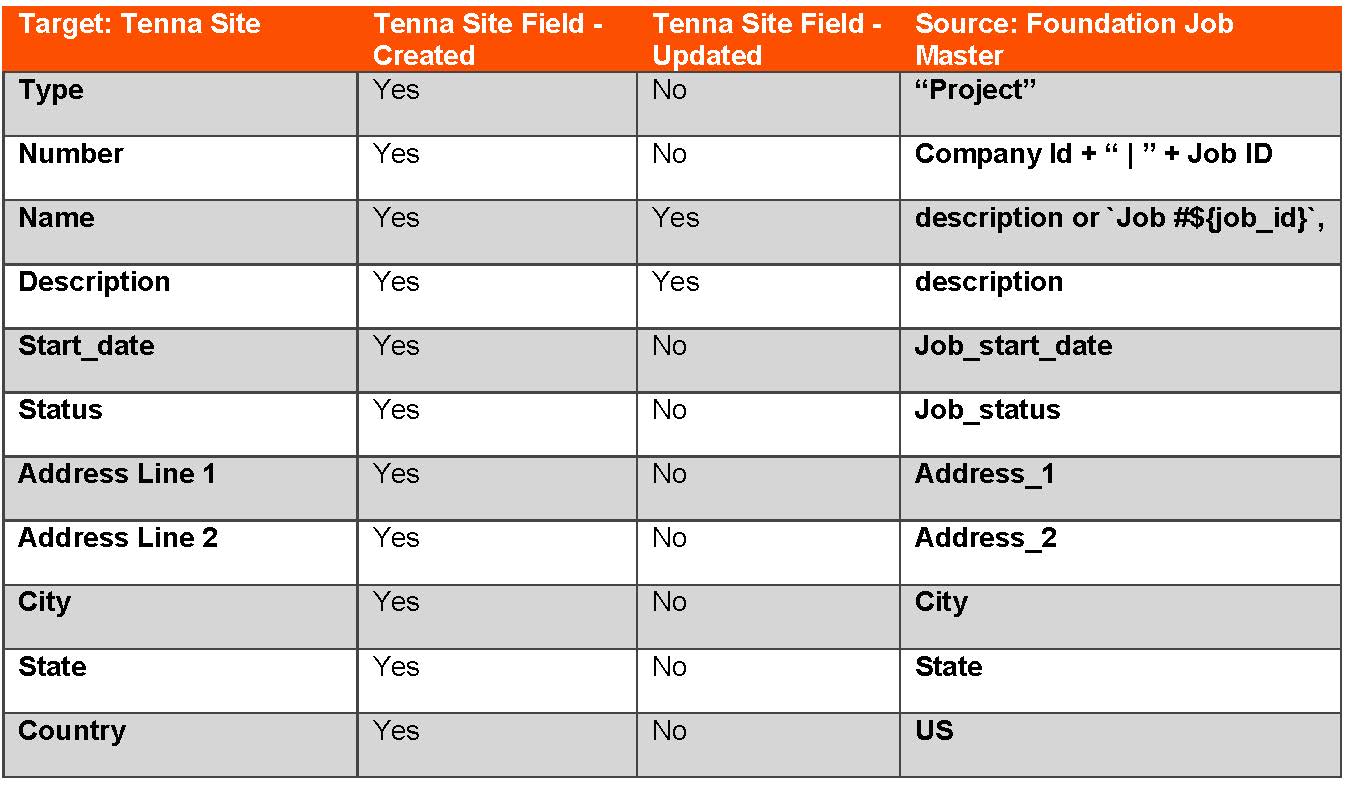
Fields
When a job is added or updated in Foundation, the integration will search Tenna "Site Name" to match Foundation "Job Description".
- If no match is found, a new Site will be created in Tenna and the fields will be populated according to the table below.
- If there is a match, the corresponding fields will be updated according to the table below.
Job Validation SQL
If you would like to validate your job data to ensure compliance, run the following SQL Query in the Foundation database:
SELECT TOP 1 description , job_id, company_id, job_start_date, job_status, original_cost, est_completion_date, address_1,address_2 , city, state,job_country , zip_code from jobs
Foundation Equipment to Tenna Assets
- Filters: None
- Sync Frequency: Every 1 hour
Data Mapping
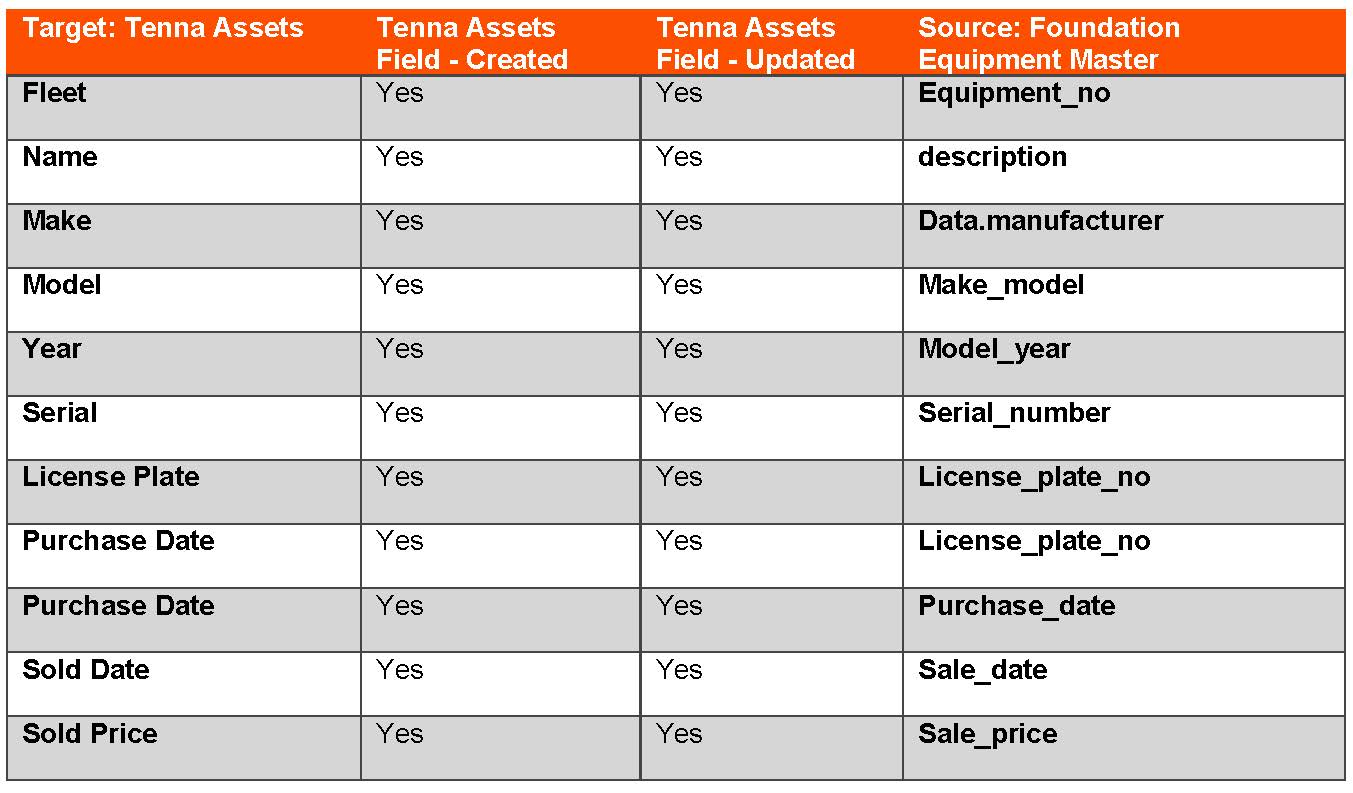
Fields
When equipment is added or updated in Foundation, the integration will search Tenna "Asset Fleet Number" to match Foundation "Equipment Number".
- When no match is found, a new Asset will be created in Tenna and the fields will be populated according to the table below.
- If there is a match, the corresponding fields will be updated according to the table below.
Equipment Validation SQL
If you would like to validate your equipment data to ensure compliance, run the following SQL Query in the Foundation database:
SELECT TOP 1 equipment_no , description , manufacturer , make_model , model_year, serial_number , license_plate_no , purchase_date , purchase_price ,sale_date , sale_price from equipment
Expected Implementation Timeline
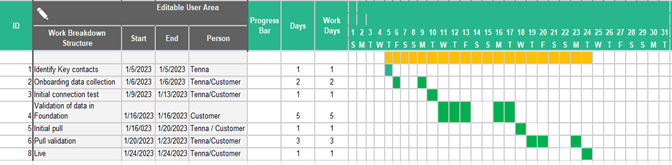
The timeline is an average of 10-20 days beyond kickoff. The following example assumes the activity starts the first of January 2023 and extends for 20 days (14 business days).
NOTE: For questions, reach out to the Tenna Integrations Department integrations@tenna.com.